Why Initial Roaming Connection Takes Time?
2026-03-14
This article explains, in a structured way, why initial connection takes time in cellular roaming environments and what can be done in design to improve it.
Introduction
When connecting smartphones or IoT devices to a cellular network,
- "It takes a long time to connect"
- "Only the initial connection is unusually slow"
are behaviors that can sometimes be observed. This tendency becomes particularly noticeable in roaming environments.
In this article, I will explain why the initial connection takes time during roaming and what can be improved through design.
Conclusion
A slow initial connection during roaming is not abnormal.
There are three main reasons:
- It takes time to discover candidate networks
- Connection attempts may fail and trigger retries
- Authentication must reach the home network, which increases latency
However, connection time can be shortened through modem settings such as band restriction and PLMN control.
Information Stored in the SIM
The following are pieces of information and state stored in the SIM that are relevant to the topic of roaming.
In the next chapter, I will first explain IMSI and PLMN.
The remaining items will appear later when discussing prioritization.
| IMSI | International Mobile Subscriber Identity |
Subscriber identity information Mandatory information (subscriber identity) |
| EHPLMN | Equivalent Home Public Land Mobile Network |
PLMNs treated as equivalent to Home, such as those of group operators Optional information (home-equivalent networks) |
| RPLMN | Registered Public Land Mobile Network |
PLMN to which the device most recently connected successfully Last registered network (stored state) |
| PLMN List | Preferred PLMN List |
PLMNs that should be preferred for roaming Optional information (preferred roaming networks) |
| FPLMN | Forbidden PLMN List |
PLMNs excluded from connection attempts Dynamically maintained list (forbidden networks) |
IMSI and PLMN
First, the SIM card stores subscriber identity information called IMSI (15 digits).
| 1 | 2 | 3 | 4 | 5 | 6 | 7 | 8 | 9 | 0 | 1 | 2 | 3 | 4 | 5 |
| MCC | MNC | MSIN | ||||||||||||
| PLMN | ||||||||||||||
- PLMN (Public Land Mobile Network): MCC (3 digits) + MNC (2 digits)
- MCC (Mobile Country Code): 3 digits
- MNC (Mobile Network Code): 2 digits*
- MSIN (Mobile Subscription Identification Number): 10 digits*
In other words, by looking at the PLMN portion of the IMSI, we can identify which operator the subscriber belongs to.
MNC is not fixed-length; it can be either 2 or 3 digits, and the figure above shows an example of 2-digit MNC + 10-digit MSIN.
Assignments using 3-digit MNC + 9-digit MSIN also exist.
These assignments do not appear to be organized as a single continuous number range. In actual networks, PLMN interpretation is based on a predefined list of MNCs, so depending on the implementation, multiple candidates may need to be tried. This can also be one of the causes of connection delay during roaming.
In Japan, operator codes are managed by the Ministry of Internal Affairs and Communications.
https://www.soumu.go.jp/main_content/000749615.pdf
Connection Flow (Attach)
The basic flow when a device connects to a cellular network is as follows:
- The UE (smartphone or IoT device) receives radio signals from the eNodeB (base station) and acquires RAT and PLMN information from the broadcast System Information
- It attempts to connect to available networks
- It sends a connection request using IMSI (or a temporary identifier)
- The request is forwarded from the base station (eNodeB) to the MME
- The MME identifies the home network from the IMSI
- The HSS is queried for authentication and authorization
- After the connection is established, a GTP session is set up and communication begins
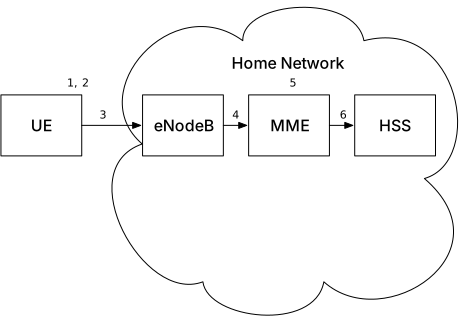
The figure above shows the case of home attachment, but the basic flow is the same in roaming as well.
What Is Different in Roaming
In roaming, authentication and subscriber information retrieval cannot be completed within the Visited Network and must reach the Home Network (possibly in another country).
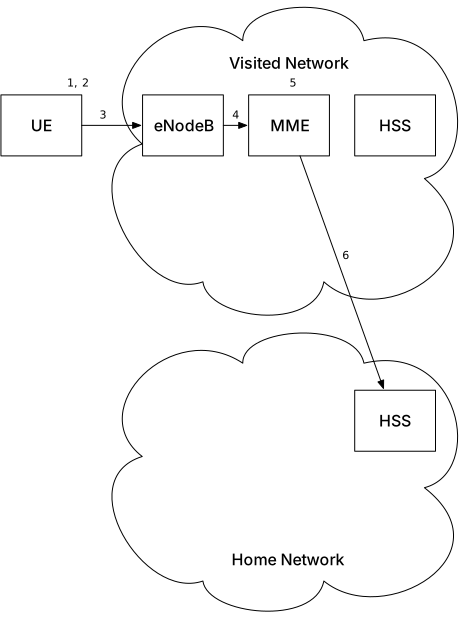
Because authentication processing must reach another country and another network, the differences are:
- Network latency
- Complexity of the routing path
The Core Reason Why Connection Takes Time
The biggest reason why it takes time is not authentication itself, but what happens before that.
The UE does not blindly try all surrounding detected PLMNs.
Instead, it selects the connection target according to a certain priority based on information stored in the SIM and past connection results.
The flow chart below shows the priority used when selecting the target PLMN.
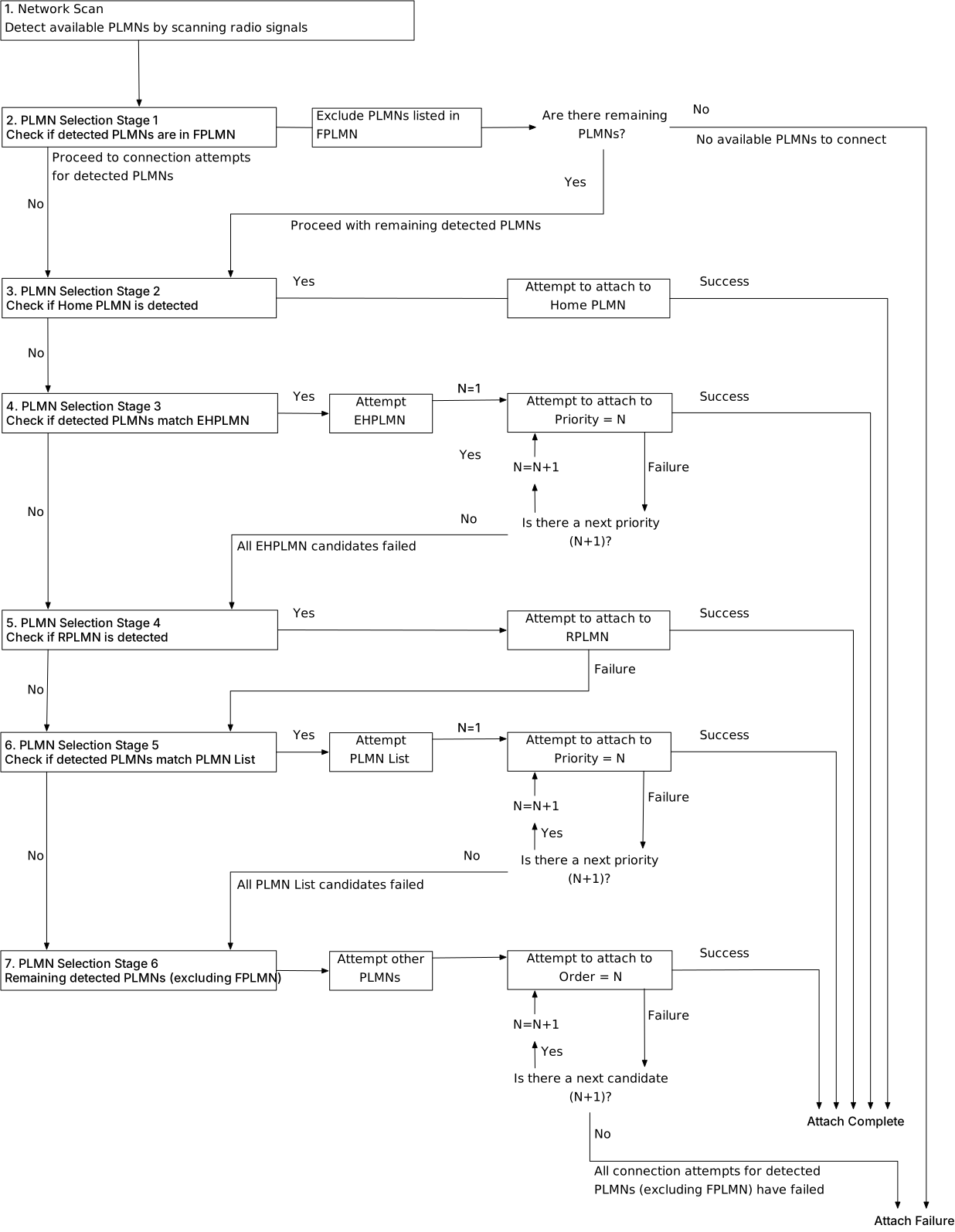
Please also refer to the table below for the criteria used in each stage.
| 1 | Network Discovery |
Receive radio signals from base stations (identify candidate PLMNs) = detected PLMNs The UE (smartphone or IoT device) receives radio signals from surrounding base stations and checks: - Which PLMNs are available - Which frequency bands can be used for communication This discovery process itself takes time In this article, the radio signals detected from base stations (including PLMN information) are referred to as "detected PLMNs" |
|
| 2 |
Target PLMN Selection |
Stage 1 Exclude FPLMN |
FPLMN is a blacklist of PLMNs to which the device should not connect If detected PLMNs include any PLMNs listed in the FPLMN, they are excluded from connection attempts If all detected PLMNs are included in the FPLMN, Attach fails at that point |
| 3 |
Stage 2 Home PLMN |
The subscriber's Home PLMN can be identified from the IMSI If the detected PLMNs include the Home PLMN, a connection attempt is made to it |
|
| 4 |
Stage 3 EHPLMN |
EHPLMN is a priority list of PLMNs treated as equivalent to Home If the detected PLMNs include any PLMNs contained in the EHPLMN list, connection attempts are made in descending priority order |
|
| 5 |
Stage 4 RPLMN |
RPLMN is the PLMN to which the device most recently connected successfully If a matching PLMN is found, a connection attempt is made to it |
|
| 6 |
Stage 5 PLMN List |
The PLMN List is a priority list of roaming-preferred PLMNs defined by the Home Network operator, based on roaming agreements and similar arrangements between operators If the detected PLMNs include any PLMNs contained in the PLMN List, connection attempts are made in descending priority order |
|
| 7 |
Stage 6 Others |
If any detected PLMNs remain that do not match Stages 1 to 5, connection attempts are made to them If all connection attempts fail, Attach fails |
|
After network discovery, the UE (smartphone or IoT device) attempts connection according to the priority described above.
However, in a roaming environment, it may still attempt:
- Networks that cannot actually be used
- PLMNs that are not available under the contract
These become "wasted attempts" and consume time.
In addition, the process does not end with a single connection failure. Through repeated retries, the UE sequentially tries:
- A different PLMN
- A different band
This loop is the largest reason why the initial connection becomes slow.
This process of "selection" and "attempt" accounts for most of the connection time.
Why This Becomes a Bigger Problem in IoT
This is not as noticeable on smartphones, but for IoT devices, this retry behavior becomes a significant problem.
For example:
- Smart meters that communicate once a month
- Battery-powered sensors
- Globally deployed devices
For these devices, the result of "Power ON = initial connection every time" is "roaming discovery + retries every time," and the number of retries directly translates into power consumption, so the impact becomes large.
On smartphones, retries are performed in the background behind the user's operation, so even if connection takes time, users tend not to notice it.
In addition, past connection history (RPLMN) and preferred lists often function effectively, so in many cases the device can connect to the appropriate PLMN from the beginning, and the issue is less likely to become visible.
Improvements (What Can Be Done in Design)
By reducing wasted attempts, the initial connection time can be shortened.
Band Restriction
By restricting the frequency bands used, the following become possible:
- Shorter discovery time
- Fewer unnecessary attempts
PLMN Control
By limiting which operators may be used for connection, the following become possible:
- Higher connection success rate
- Fewer retries
Modem Configuration Optimization
Many modems allow adjustment of:
- Scan order
- Preferred PLMN
- RAT (LTE / NB-IoT / Cat-M)
By optimizing these settings according to the actual operating environment, the initial connection time can be significantly improved.
Summary
The reasons why the initial roaming connection becomes slow are:
- Network discovery
- Repeated connection attempts
- The length of the authentication path
The two important points are:
- "Slow" does not mean "abnormal"
- There is room for improvement through design
Especially in IoT, it is important to design with device characteristics, deployment region, and communication frequency in mind.
Closing Remarks
Roaming is not simply "overseas connectivity," but a structural mechanism that spans multiple networks.
By understanding that structure, it becomes possible to control connection time, power consumption, and communication stability.
In the next article, I will explain GTP session establishment and the data path.