How Devices Discover Cellular Networks
2026-03-21
Explains how cellular devices detect radio signals and select networks from the perspectives of Band, frequency, RAT, and PLMN
Introduction
IoT devices and smartphones connect to networks almost automatically simply by powering on.
However, behind the scenes, a process to select which radio signal to use is always executed.
This article focuses on the behavior before Attach, and organizes how devices discover cellular networks.
Conclusion
Devices select connection candidates from multiple radio signals broadcast by base stations,
based on configured Band and RAT, and then proceed to the Attach process.
1. What Does the Base Station Broadcast?
Each mobile network operator (MNO) provides services using frequencies allocated per country.
Base stations (eNodeB in LTE) continuously broadcast radio signals containing the following information.
■ RAT (Radio Access Technology)
RAT represents the radio access method.
Typical examples:
- LTE
- LTE-M
- NB-IoT
- GSM (2G)
Even within the same frequency band, different RATs are treated as separate networks.
Below is a summary of RATs by generation.
| Generation | RAT | Characteristics | In the IoT World |
| 2G | GSM |
The oldest generation of cellular networks - Primary use: Voice communication (circuit-switched) - Data: Low speed (GPRS / EDGE) - Feature: Wide coverage (still exists in some countries) |
Used by legacy devices Still exists as fallback in some regions However, many countries are shutting it down, so it is rarely assumed in new designs |
| 3G | UMTS W-CDMA |
Successor to 2G - Primary use: Voice + data - Data: Medium speed (several Mbps) - Feature: Widespread adoption of packet communication |
Once mainstream but now transitional 3G shutdown is progressing globally (Japan already completed) |
| 4G | LTE |
The current mainstream RAT - Primary use: High-speed data (All-IP) - Data: High speed - Feature: Low latency, high efficiency |
LTE-M and NB-IoT are widely used for IoT |
| LTE-M (Cat-M1) | Low-power IoT variants | Low power, medium data, mobility supported | |
| NB-IoT | Ultra-low power, low data, limited mobility | ||
| 5G | NR | Ultra-high speed, ultra-low latency, massive connectivity | LTE is still dominant, 5G is use-case dependent |
Devices scan radio signals for each RAT, and more supported RATs increase connection time.
■ PLMN (Public Land Mobile Network)
PLMN is an identifier used to distinguish mobile network operators.
It is composed of a combination of:
- MCC (Mobile Country Code)
- MNC (Mobile Network Code)
Devices use this PLMN to determine which operator’s network they are connected to.
※ For details on the structure of PLMN and how it is used in roaming,
please refer to
"Why Initial Roaming Connection Takes Time?"
■ Key Point
The important point is:
Radio signals contain information about “which network they belong to” (RAT and PLMN)
Devices do not rely only on signal strength,
but also inspect the contents of the signal to determine connection candidates.
2. How Devices Search for Radio Signals (Scanning)
Devices (more precisely, cellular modems) start network discovery after power-on.
This process is called "scanning."
■ Basic Behavior of Scanning
Cellular modems search for radio signals based on the following conditions:
- Configured Band (frequency band)
- Configured RAT
In other words,
it is important to understand that devices do not scan all radio signals, but only those within the configured range
■ Actual Behavior of Scanning
Base stations simultaneously broadcast radio signals that contain combinations of frequency, RAT, and PLMN.
Devices receive these signals and select connection candidates based on their own configuration.
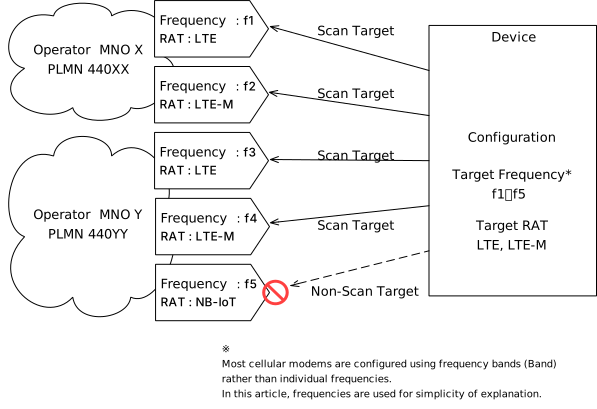
In this diagram, the device is receiving radio signals in the following state:
- Multiple frequencies within a Band (f1–f5)
- Different RATs for each frequency (LTE / LTE-M / NB-IoT)
- Two mobile network operators (PLMN)
Within this context, the device configuration is defined as follows:
- Target frequencies (for explanation): f1–f5※
- Target RAT: LTE / LTE-M
※ Most cellular modems are configured using frequency bands (Band) rather than individual frequencies.
Here, frequencies are used for simplicity of explanation.
As a result, the following four connection candidates are extracted:
- Frequency f1 / RAT: LTE / PLMN: 440XX
- Frequency f2 / RAT: LTE-M / PLMN: 440XX
- Frequency f3 / RAT: LTE / PLMN: 440YY
- Frequency f4 / RAT: LTE-M / PLMN: 440YY
This is the resulting behavior.
These four connection candidates proceed to:
- PLMN Selection (network selection)
- Attach (connection and authentication process)
※ For details on PLMN Selection and Attach, please refer to
"Why Initial Roaming Connection Takes Time?"
■ Flow
[Power ON]
   ↓
[Start Scanning]
(Receive radio signals within the configured Band range)
   ↓
[Detect Candidate Cells]
(Extract signals that meet the RAT conditions)
   ↓
[Generate PLMN List]
(Create a list of connection candidates)
   ↓
[Proceed to Attach Attempt]
(Connect and authenticate based on priority)
3. Summary
This article has explained the mechanism of "scanning" that devices perform before connecting to a network.
The key points are as follows:
- Base stations broadcast radio signals that contain combinations of frequency, RAT, and PLMN
- Devices receive these signals and filter connection candidates based on their configuration (Band / RAT)
- As a result, multiple connection candidates (PLMN × RAT) are generated
- These candidates proceed to PLMN Selection and the Attach process
The most important point here is: 👉 Devices do not know the connection target in advance — they “discover” and “select” networks by scanning radio signals
From a practical perspective:
- More supported Bands
- More supported RATs
increase the number of scanning targets, 👉 which tends to increase the time required to establish a connection (especially during the initial connection)
Therefore, modem configurations such as:
- Limiting unnecessary Bands
- Disabling unused RATs (e.g., 2G / NB-IoT)
are: 👉 important factors for optimizing connection time
The processes that follow the scanning described in this article:
- PLMN Selection (network selection)
- Attach (connection and authentication)
are explained in detail in: "Why Initial Roaming Connection Takes Time?" Reading it together with this article will help you better understand the complete flow from scanning to network connection.